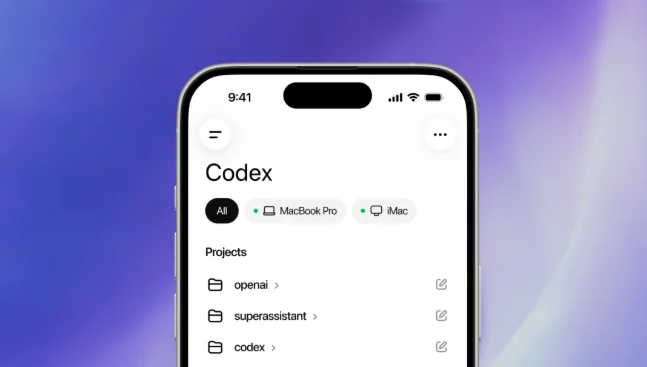
OpenAI has brought Codex into the ChatGPT mobile app, giving developers a way to monitor and steer AI coding agents from iPhone and Android. The update turns the phone into a remote control for Codex sessions running on a Mac, laptop, or remote development environment, and marks the most direct push yet to make AI-assisted coding work outside the desk.
Codex was built as a background coding agent. It writes features, fixes bugs, runs tests, and proposes pull requests while working across files, terminals, and browsers on a host machine. Until now, you needed to be at that machine to approve commands, review diffs, or redirect the agent when it hit a wall.
The mobile integration changes that. OpenAI runs Codex on macOS as a standalone app. To connect your phone, you update both the Codex Mac app and the ChatGPT mobile app, open the new “Codex mobile” section on the Mac, and scan a QR code with your phone. Once paired, the ChatGPT app mirrors the live state of the Codex session.
The phone doesn’t run code. Files, credentials, and permissions stay on the host machine. What flows to the phone are screenshots, terminal output, code diffs, test results, and approval requests. From there you can review outputs, approve commands, switch models, start new threads, and send follow-up prompts without opening the laptop.
OpenAI describes it as staying “in the loop from anywhere while Codex gets work done across your laptops, devboxes, or remote environments.” The company stresses that users should only pair devices they own and trust, since Codex will access files, apps, and the browser on the host machine.
What you can actually do from the phone
The mobile app is built around supervision and redirection, not full editing.
When Codex hits a step that requires permission, it pushes a notification. You can approve, reject, or modify the command from the ChatGPT app. If a test fails, you’ll see the output and can tell Codex to investigate, adjust the code, and re-run. If the agent gets stuck on a bug, you can add context or point it to a different file.
You can also start new tasks from the phone. Send a message like “add login with Google to this repo” and Codex will pick it up on the host machine. It can summarize recent changes, highlight unresolved issues, and generate a briefing from Slack, emails, and documents tied to the project. The summary refreshes as new information comes in, so you don’t lose context between sessions.
Files and outputs sync back to the desktop automatically. If you approve a command at 2 p.m. from a café, Codex runs it on the Mac and the results appear in the mobile thread. The workflow is continuous across devices, and OpenAI says support for tablets and smartwatches is coming.
Why OpenAI built it now
Codex usage has grown fast. OpenAI reported more than 4 million weekly active developers on Codex as of early May 2026. The agent is being used for feature development, code reviews, and codebase Q&A, often running for hours at a time.
The problem is that developers don’t sit at a desk for hours at a time. Meetings, travel, and off-hours interrupts mean AI agents either idle or drift without direction. Mobile supervision keeps the agent productive and reduces context switching when you get back to the machine.
The timing also reflects competitive pressure. Anthropic released remote monitoring for Claude Code earlier this year, letting developers approve actions and view outputs from mobile. Google and Cursor have pushed similar agent modes. For OpenAI, mobile access is a way to keep Codex sticky for developers who already use ChatGPT on their phones daily.
The technical setup and limits
Right now, the feature works with Codex running on macOS. Windows support is on the roadmap. Codex still requires a host machine with the codebase and environment set up. It doesn’t run in the cloud by default, though OpenAI has been testing managed devboxes for enterprise users.
The mobile app doesn’t allow direct code editing. You can review and comment, but edits happen on the host. That keeps the security model simple: the phone never holds credentials or source files. If you lose the phone, you revoke access from the Mac app and the connection breaks.
Some users have reported minor connectivity hiccups when switching networks or when the Mac goes to sleep. OpenAI says keeping the Mac awake and on a stable connection gives the best experience.
What it means for coding workflows
The shift is practical rather than flashy. It doesn’t replace a keyboard, but it removes the friction of having to be at the machine to keep an AI agent moving. For teams, it means a lead developer can review and approve a Codex-generated PR while offsite. For solo developers, it means you can start a refactor before bed and check progress in the morning without reopening the project from scratch.
OpenAI is also expanding Codex’s reach on desktop. The recent Chrome extension lets Codex interact with browsers to reproduce bugs, and deeper macOS integration lets it control apps directly. Mobile becomes the control plane on top of that.
Looking Ahead
OpenAI says future updates will expand device compatibility and add support for non-technical users to run predefined Codex workflows. The goal is to make it easier for product managers, designers, and founders to trigger and monitor coding tasks without writing prompts from scratch.
For now, Codex in the ChatGPT mobile app is in preview for all plans, including Free and Go, on iOS and Android. If you have a Mac running Codex, you can update and pair it today.
The broader trend is clear: AI coding agents are moving from stationary tools to ambient ones. The work happens on the machine, but the control and decision-making move with you.